
This tutorial was written in 2020. The examples were checked in sequence with Pandas 2.2.3 and Faker 4.1.3.
Before starting
Most methods introduced here apply to both Series and DataFrames, though some apply to only one. The examples cover basic usage; consult the Pandas API reference and user guide for more options.
Preparation
Install Jupyter, Pandas, and Faker in a virtual environment. Faker generates sample records for the exercises.
pip install jupyter pandas fakerWhat is Pandas?
Pandas is a Python data-analysis library built on NumPy. Its labeled Series and DataFrame structures make it easier to work with one- and two-dimensional data.
Series
A Series is a one-dimensional array with an index and a name:
import pandas as pd

series = pd.Series([1,2,3,4,5])
series
The displayed 0–4 values are the default index. You can also set the index and name yourself:
series = pd.Series([1,2,3,4,5], index=["a", "b", "c", "d", "e"], name="alphabet")
series
DataFrame
A DataFrame is a two-dimensional structure with an index and columns. It can be thought of as a collection of Series whose names become column names:
import pandas as pd

df = pd.DataFrame({
    "number": [1, 2, 3, 4, 5],
    "alphabet": ["a", "b", "c", "d", "e"]
}, index=["가", "나", "다", "라", "마"])
df
Like a Series, a DataFrame uses a numeric index starting at zero by default.
Inspecting data
Import Pandas and Faker, seed the generator, and create 500 sample profiles. The generated names and the following screenshots may differ with the Faker version; use labels from your own data in the loc examples.
import pandas as pd
from faker import Faker

# Prepare the fake data generator
Faker.seed(0)
fake = Faker()
data = [fake.simple_profile() for _ in range(500)]
df = pd.DataFrame(data)Head and tail
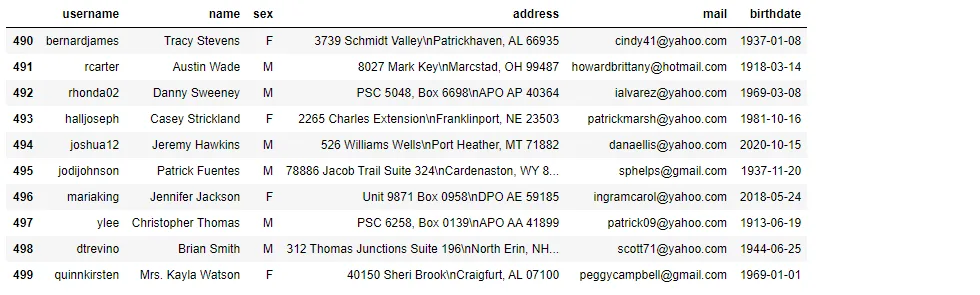
When a dataset is large, inspecting a few rows can help reveal its structure. head and tail return rows from the beginning and end:
df.head(10)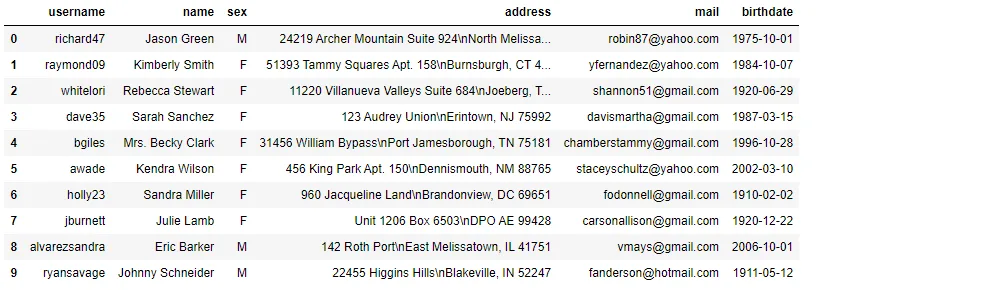 ```python
df.tail(10)
```
Position-based indexing with iloc
Indexing selects part of the data. iloc uses zero-based positions and square brackets. This selects the third through fifth rows; the slice excludes the stop position:
# Select the third through fifth rows
df.iloc[2:5] # Use square brackets
Select a column by position too:
df.iloc[2:5, 0]
Leaving the start or end of a slice empty means the beginning or end. Here :2 selects the first two columns:
df.iloc[[1, 2, 4], :2] ```python
df.iloc[:5, [1, 2, 3, 5]]
```

A step of -1 reverses the rows:
df.iloc[::-1, :].head()
Label-based indexing with loc
loc selects by label. First use username as the index, then select one or more labels and columns:
df = df.set_index("username")
df.head()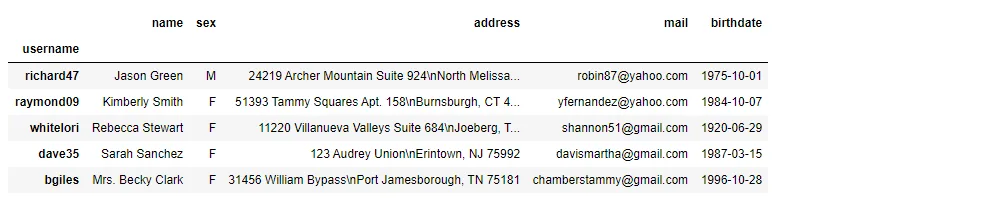 ```python
df.loc["richard47"]
```
 ```python
df.loc[["richard47", "raymond09", "dave35", "bgiles"], ["name", "sex", "address"]]
```

Transpose rows and columns
Use T to swap rows and columns. For this exercise, transpose again to return to the original layout:
df = df.T
df.head()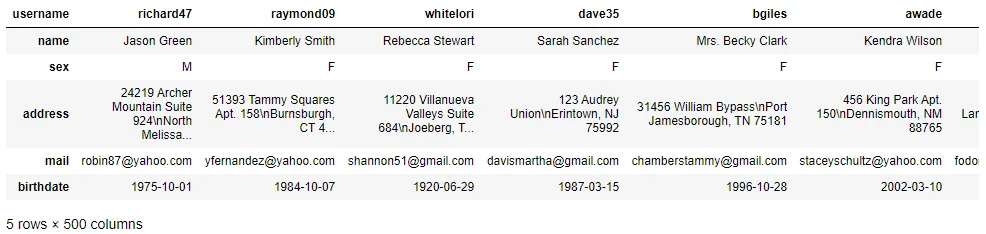 ```python
df = df.T
```
The next post covers indexes and columns.