
This tutorial was written in 2019. Python and library APIs may need changes to run these examples today.
The previous post introduced asynchronous work. This post explores Python's asyncio module.
Terms
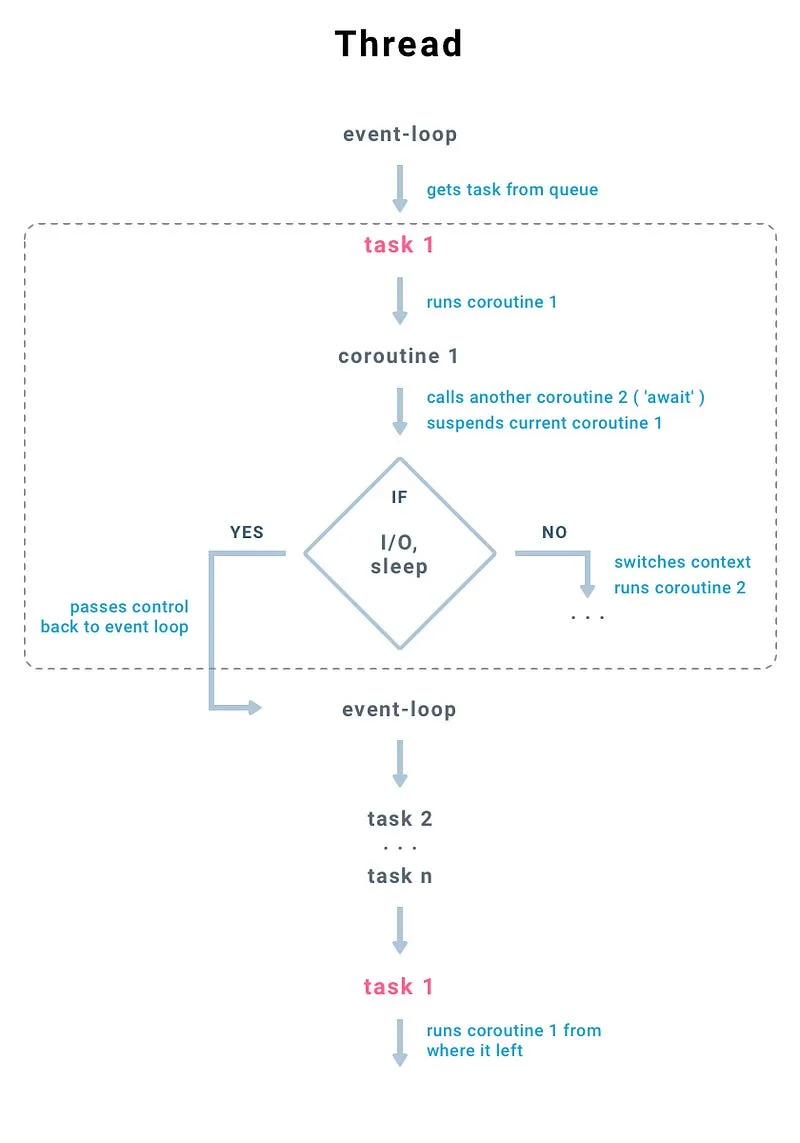
An event loop runs tasks and can switch to another task when a coroutine suspends while waiting. A coroutine can yield control and resume from the same point with its state intact. The diagram illustrates this handoff; the original article is the image source.
Basics
Define a coroutine with async def and suspend it with await. An awaitable may be a coroutine or another awaitable object, such as a Future. asyncio.sleep yields control; calling time.sleep directly in the event-loop thread blocks it.
This historical example creates an event loop with get_event_loop and runs one coroutine:
import asyncio
import time

async def sleep():
    await asyncio.sleep(5)

start = time.time()

loop = asyncio.get_event_loop()

loop.run_until_complete(sleep())
end = time.time()

print(str(end-start)+'s')
> 5.00485897064209sA single task cannot demonstrate overlap. Compare two synchronous functions, which wait for about nine seconds in total:
import time

def sub_routine_1():
    print('Subroutine 1 starts')
    print('Subroutine 1 waits 5 seconds')
    time.sleep(5)
    print('Subroutine 1 ends')

def sub_routine_2():
    print('Subroutine 2 starts')
    print('Subroutine 2 waits 4 seconds')
    time.sleep(4)
    print('Subroutine 2 ends')

if __name__ == "__main__":

    sub_routines = [sub_routine_1, sub_routine_2]

    start = time.time()
    for i in range(2):
        sub_routines[i]()
    end = time.time()
    print(f'time taken: {end-start}')
>>
Subroutine 1 starts
Subroutine 1 waits 5 seconds
Subroutine 1 ends
Subroutine 2 starts
Subroutine 2 waits 4 seconds
Subroutine 2 ends
time taken: 9.001360893249512Run coroutines concurrently
asyncio.gather takes coroutine arguments, or an unpacked list of them. Here the four- and five-second waits overlap:
import asyncio
import time

async def coroutine_1():
    print('Coroutine 1 starts')
    print('Coroutine 1 waits 5 seconds')

    await asyncio.sleep(5)
    print('Coroutine 1 resumes')

async def coroutine_2():
    print('Coroutine 2 starts')
    print('Coroutine 2 waits 4 seconds')
    await asyncio.sleep(4)
    print('Coroutine 2 resumes')

if __name__ == "__main__":

    loop = asyncio.get_event_loop()

    start = time.time()


    loop.run_until_complete(asyncio.gather(coroutine_1(), coroutine_2()))
    end = time.time()

    print(f'time taken: {end-start}')
>>
Coroutine 1 starts
Coroutine 1 waits 5 seconds
Coroutine 2 starts
Coroutine 2 waits 4 seconds
Coroutine 2 resumes
Coroutine 1 resumes
time taken: 5.004844665527344The original run took about five seconds, and the second coroutine finished first. Timing depends on the environment.
Use blocking functions with an executor
loop.run_in_executor runs a blocking function in an executor so that the event loop can continue. Pass an executor (or None for the default), the function, and its positional arguments:
import asyncio
import time

async def coroutine_1():
    print('Coroutine 1 starts')
    print('Coroutine 1 waits 5 seconds')
    loop = asyncio.get_event_loop()


    # Params of run_in_executor:
    # executor(None: default loop executor), func, *args

    await loop.run_in_executor(None, time.sleep, 5)

    print('Coroutine 1 resumes')

async def coroutine_2():
    print('Coroutine 2 starts')
    print('Coroutine 2 waits 5 seconds')
    loop = asyncio.get_event_loop()
    await loop.run_in_executor(None, time.sleep, 4)
    print('Coroutine 2 resumes')

if __name__ == "__main__":

    loop = asyncio.get_event_loop()


    start = time.time()
    loop.run_until_complete(asyncio.gather(coroutine_1(), coroutine_2()))
    end = time.time()

    print(f'time taken: {end-start}')
>>
Coroutine 1 starts
Coroutine 1 waits 5 seconds
Coroutine 2 starts
Coroutine 2 waits 5 seconds
Coroutine 2 resumes
Coroutine 1 resumes
time taken: 5.00641131401062An executor introduces thread-management overhead, but CPython threads can overlap I/O while waiting. The GIL does not prevent that overlap; cost and performance depend on the workload.
A thread executor experiment
This is the original 10,000-thread experiment. Running it unchanged can exhaust system resources; reduce the worker and task counts for your environment.
import asyncio
import time
from concurrent.futures import ProcessPoolExecutor, ThreadPoolExecutor

async def sleep(executor=None):
    loop = asyncio.get_event_loop()
    await loop.run_in_executor(executor, time.sleep, 1)

async def main():


    executor = ThreadPoolExecutor(max_workers=10000)


    futures = [
        asyncio.ensure_future(sleep(executor)) for i in range(10000)
    ]
    await asyncio.gather(*futures)

if __name__ == "__main__":
    start = time.time()


    asyncio.run(main())
    end = time.time()
    print(f'time taken: {end-start}')
>> time taken: 3.2648983001708984An asyncio.sleep experiment
The original comparison used coroutine sleeps and reported the following elapsed time. These are historical measurements, not a general benchmark:
import asyncio
import sqlite3
import time

async def sleep():
    await asyncio.sleep(1)

async def main():

    futures = [
        asyncio.ensure_future(sleep()) for i in range(10000)
    ]
    await asyncio.gather(*futures)

if __name__ == "__main__":
    start = time.time()
    asyncio.run(main())
    end = time.time()
    print(f'{end-start}')
>> 1.1979601383209229The next post compares approaches to network requests.